Tell the Scheduler when your year starts, when it ends, and which weeks you're taking off. It lays out every subject, day by day, for every child in the house. When life gets in the way, press Refresh and it spreads the rest back out.
One purchase covers your whole family: every child, Tiny Tots through 12th Grade
Add your own courses right alongside your Timberdoodle materials
Print a weekly or daily checklist for your child to work with
Log what's done, set break weeks, and pull progress reports and transcripts
Already have a current Timberdoodle kit or handbook? You already have the Scheduler. Log in and enter your activation code.

The Timberdoodle Scheduler turns your curriculum into a plan for the whole school year, one day at a time. You tell it when you start, when you finish, which days you do school, and when you're taking breaks. It spreads every course across those days and shows each child what's on for today.
Each subject gets its own lessons on real dates, in the same units the publisher uses: lessons, sections or pages
Check things off as you go, or print a weekly checklist for the fridge and a daily one for your child
Fell behind? Press Refresh and choose how to catch up. Nothing moves until you say so
It comes free with every 2026 Timberdoodle curriculum kit and every Handbook + Scheduler. Not using a kit this year? One-Year Family Access is $69.95 and covers every child in your house.
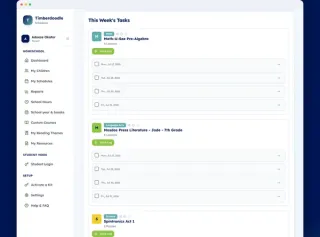
See a sample week for:
See a sample 5th Grade week
The Timberdoodle Scheduler lays out every subject day by day, with a box for each thing to check off. Here is a Monday from the middle of the year with the 5th Grade kit, Classic edition, Complete level.
In the Nonreligious kit, Daily 6-Trait Writing Grade 5, Weekly Real-World Writing Grades 5-6 and Discover! Social Studies 5 take the place of Jump In Bundle and America the Beautiful.
Monday
13 to check off- Mosdos Press Literature Coral Choose a Color - page 408
- Spelling You See Level F Lesson
- 101 Doodle Definitions Definition 66
- Jump In Bundle Lesson 115
- Math-U-See Epsilon Lesson 24: Video lesson
- Building Thinking Skills Book 2 Pages 222–223
- Genius Connection Game
- America the Beautiful Lesson 97
- Real Science-4-Kids Book 5 14.5 What Do Geologists Study? - page 125
- Stopmotion Explosion Kit 2.0 Project
- My Year of Discovery Days 235–236
Most families never pay for the Scheduler separately. It comes with the curriculum. Here's how both paths work.

Free With Any Current Kit or Handbook

Or Buy Access on Its Own: $69.95
Buy It On Its Own, or Get It Free in a Kit


Yes. For Kindergarten, open "See a sample Kindergarten week" above: an ordinary week from the middle of the year, laid out the way the Scheduler lays it out.
The screenshots on the One-Year Family Access page show the rest of the app: the course list, breaks, reports and the student view. There's no free trial.
Nothing moves until you say so. When a sick week or a new baby puts you behind (hey, it happens), press Refresh and choose how to catch up: finish by your original end date, add weeks to the end of your year, slide everything forward, or cover a little less. Ahead of schedule? Spread the rest out, or keep your pace and finish early.
Only one day or one week went sideways? You can move just that day or that week.
Yes. You choose the school days for each schedule, so a four-day week, a three-day week, or Monday to Thursday with Fridays off all work. You can also set breaks and recurring days off, like birthdays or a family trip, when you build the schedule.
Change your mind mid-year? Edit the school days, save, and the Scheduler spreads what's left across the new ones.
No. One kit or one Family Access covers every child in the house, Tiny Tots through 12th Grade, Classic and Nonreligious. Each child gets their own schedule. Building a second child's year from the first? Duplicate the schedule and adjust it.
Yes. Add P.E., piano, a co-op class, or another publisher's math. Tell the Scheduler how many lessons it has (or how often it happens, for ongoing things like music practice) and it spreads it across your year right alongside everything else. With One-Year Family Access you can build a whole year with no Timberdoodle kit at all.
Yes. Your child can sign in on your device with a four-digit passcode, or with their own email login, and check off their own work. They'll see streaks and a burst of confetti when they finish. Prefer paper? Print a daily checklist instead.
A teacher or tutor can also be given view-only access to a child's schedule.
That's the worry the Scheduler exists for. You don't have to work out how to pace a stack of books across a year. It does that and tells you what today looks like.
One honest note: a kit is meant to be picked from, and if you leave every course switched on, a day can look like a lot. Remove what you're not using this year, press Refresh, and the rest spreads back out. Adding weeks to your year lightens each day too. Still looks heavy? Chat with us, tell us the grade, and we'll tell you what we'd drop first.
It keeps a running record as you go: what's done, progress by course, completed work, and a grade transcript if you turn grading on. If you track hours, it prints a School Hours Log by course. For a charter school, umbrella school or state report, you can set up a report template that matches what they ask for.
What you're required to keep depends on your state, so check your state's rules.
It runs in your web browser, so it works on a computer or a phone. It needs an internet connection, and there's no app to download.


First of all—welcome! If you're just starting your homeschool journey, we're thrilled to cheer you on and help you every step of the way. Here are some questions you might have as you get started. How...
Read Article
We often get the question, "How do Timberdoodle Curriculum Kits line up with my state's requirements?" Here is a brief overview of what subjects each state requires and how that lines up with our...
Read Article
Picking a homeschool curriculum shouldn't feel like a gamble. Use this step-by-step checklist to cut through the noise, align with your family's daily routine, and choose the right learning materials...
Read Article